


Live Soccer Scores - IGScore
4.213.00 Reviews
App Specs
- Version
- 2.4.5
- Updated On
- License
- Free
- Downloads
- 5,000,000+
- Developer
- HIPPO TECHNOLOGY SDN. BHD.
- Categories
- Sports
- Platform
- Android, iOS
Screenshots
 Analysis by AppCompare
When I’m following several matches at once, I want a score app that gets me to the important details quickly without turning my phone into a constant stream of noise. That’s the main appeal of Live Soccer Scores - IGScore: it is a free sports app from HIPPO TECHNOLOGY SDN. BHD. built around checking live soccer action, results and statistics. I find the idea useful for the ordinary gaps in a day—when I’m away from the television, waiting for a match to start, or trying to keep up with a team while doing something else.
What “live” should mean in everyday use
A live-score app is most valuable when it helps me answer a few simple questions at a glance: what is happening, how much time is left, and whether I should open the match for more context. IGScore is aimed at that quick check-in. I would use it as a companion to a broadcast or as a lightweight way to follow a match when watching is not practical, rather than as a replacement for watching the game itself.
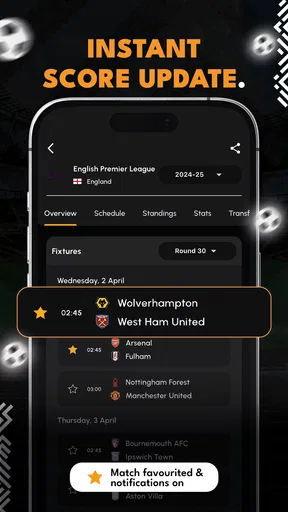
There is an important distinction between a score arriving promptly and every detail arriving at exactly the same moment as the action on screen. Broadcasts, streams and score services can have different delays, so I would not use any phone alert as a precise cue for a live wager or a synchronized watch party. For following the broad flow of a match, though, score updates and event notifications can be much more convenient than repeatedly searching for a result in a browser.
Speed expectations and match-day checks
The app’s appeal depends on timely updates, but I would set sensible expectations: network quality, background activity and the phone’s notification settings all affect how quickly an alert reaches me. If a goal matters enough that I cannot miss it, I keep notifications enabled for that match and make sure the app is allowed to send them. If I only want the final result, I can check later instead of letting every event interrupt the day.
A practical routine is to choose the teams or competitions I genuinely follow before a busy match day, then check the live view when I have a moment. That is more useful than enabling every possible alert and eventually ignoring them all. For a game I’m watching on a delayed stream, I may also turn off event notifications to avoid learning about a goal before it appears on screen. These small choices make a score app feel helpful rather than intrusive.
Heavy use: several fixtures, one phone
The most demanding use case is not necessarily a single major match; it is a crowded day with multiple fixtures I care about. In that situation, a quick score check can save me from jumping between league pages, search results and separate team accounts. I would start with the matches that matter most, then open other fixtures only when a score or result gives me a reason to look closer. This keeps the app’s role clear: a central scoreboard first, a place to explore second.
For example, imagine I’m travelling home while my club plays and another match affects its position in a competition. I can check both scores during a break, then return to what I was doing rather than keeping a video stream open. If one match becomes close near the end, I can focus on that fixture and leave the other alone. That workflow is especially convenient for fans who follow more than one competition but do not need a live broadcast for every game.
Worth Reading Before You Choose

Flipboard Shows What News Apps Must Do Beyond the Feed

Switching to Android Auto Means Rethinking Your Driving Routine

Google Calendar Makes a Crowded Week Easier to Manage

Ludo King Makes the Most of the Minutes Between Plans

Baby Panda World Brings Quick Play to Modern Phones, but Its Game Library Feels Busy

ESPN’s Live Game View Makes Following Close Games Easier
Reliability is more than a notification
I judge a live-score app by whether it remains useful when I open it at an inconvenient moment: between errands, during a commute, or just after a match has finished. Notifications are only one part of that experience. A clear route from the match list to the score and relevant context matters too, because an alert that sends me into a confusing screen does not save much time.
When an update seems late, I first check whether the phone has a stable connection and whether background notifications are enabled. Those are sensible checks before assuming the score service itself is at fault. If I’m following a match that is especially important, I may cross-check a key incident with the broadcaster or another trusted source. That is not a reason to avoid IGScore; it is a good habit for any live-score service when timing or detail really matters.
Device limits and notification trade-offs
IGScore supports Android 7.0 and later, which gives many older devices a route to install it, but compatibility alone does not guarantee the same experience on every phone. Older hardware, a busy device or restrictive battery settings can affect how smoothly apps refresh in the background. If notifications seem inconsistent, checking the phone’s app and battery settings is a better first step than repeatedly opening and closing the app.
I also treat alerts as a resource to manage. A notification for every match can create more interruption than insight, while a carefully chosen set can make the app feel like a personal scoreboard. Fans who follow only one club may need very little setup. People tracking several leagues should be more selective and review their choices when a tournament or season changes, so yesterday’s interests do not keep producing noise.
Who will get the most from it
IGScore is a natural fit for fans who want scores and match context on a phone without committing to a stream. It can also suit someone who follows teams in different competitions and wants one place to check what is happening. The app has a Teen content rating, and its free price makes it easy to try as a supplementary tool before deciding whether it belongs in a regular match-day routine.
I would be less enthusiastic about it for someone whose main priority is watching full matches, hearing live commentary, or following a sport beyond soccer in depth. A score tracker answers a different need from a streaming service, a club’s official channel or a dedicated statistical platform. If I want tactical analysis or a particular competition’s authoritative coverage, I would use a source built for that purpose alongside a score app rather than expect one compact tool to do everything.
How it fits beside other soccer apps
Compared with checking search results or a league’s website, a dedicated scores app is convenient when I want to move quickly between fixtures and keep a set of interests close at hand. Compared with a club app, it is potentially more useful when I follow several teams or want a broader view across competitions; a club’s own app may still be the better place for official club news and community material. A streaming app, meanwhile, is the right choice when seeing the action matters more than checking the score.
The trade-off is that a general score hub has to balance breadth with focus. A fan interested in one team’s detailed news may find a specialist source more relevant, while someone who wants only a final score may find any full-featured app more than they need. I see IGScore as most useful in the middle: for people who want more than a quick web search but do not need a dedicated media experience for every game.
Small habits that make the app more useful
My first tip is to decide whether I want alerts for the whole match or only a quiet way to check results. That distinction prevents the app from competing with work, study or a live broadcast. My second is to use match notifications selectively on a day with many fixtures; alerts for a handful of meaningful games are easier to act on than a flood of updates.
A third useful habit is to check the match list before a busy stretch begins, rather than trying to configure everything after kickoff. It gives me a chance to identify the fixtures I care about and reduces the chance of overlooking an important game in a crowded schedule. Finally, I treat detailed statistics as context, not a guarantee. They can help me compare performances or inform a fantasy decision, but they cannot tell me with certainty what will happen next.
Quick access without overpromising performance
IGScore is designed for fast score checks, but I would not make claims about exact loading times or battery use without testing the same phone, connection and settings over time. My practical expectation is simpler: on a supported device with a good connection, opening an app for a score check should be less involved than navigating through multiple web pages. If a phone is older or running many tasks, I would keep the workflow focused and avoid expecting every background update to behave identically.
Its current version is 2.3.0, and the app has an average rating of 4.3 from around 5,200 ratings, with over 5 million installs. Those figures suggest that it has found a sizeable audience, but they do not tell me whether its coverage and notification style suit a particular fan. I would still judge it by trying a normal match-day routine: follow a couple of relevant fixtures, see whether the information is easy to reach, and adjust alerts if they become distracting.
Real-Time Updates: Never Miss a Beat
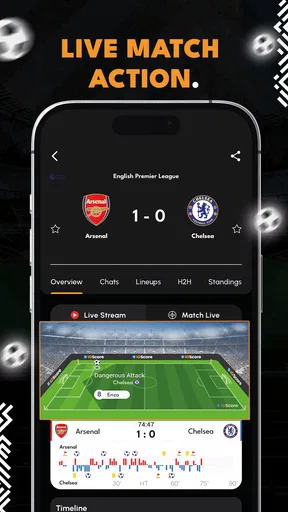
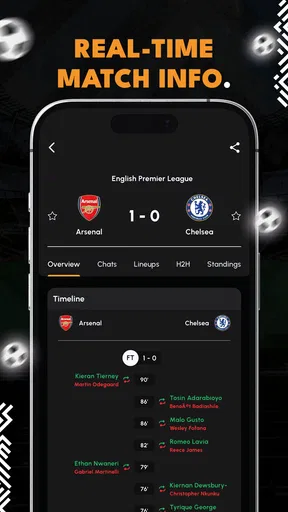
One of the standout features of IGScore is its real-time updates. The app ensures you're always in the loop, with live notifications that keep you informed of every goal, card, and substitution. I found this especially handy during those nail-biting matches when I couldn't be glued to the TV. It's like having a little soccer assistant in your pocket, whispering all the latest happenings.
User Interface: Clean and Intuitive
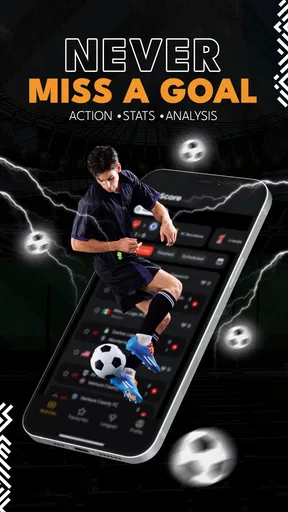
The first thing that struck me about IGScore is how clean the interface is. The developers have done a fantastic job of keeping it simple and intuitive. Navigating through the app is a breeze, even if you're not particularly tech-savvy. The layout is neat, with all the essential info right at your fingertips. Whether you want to check the standings or find out which matches are on today, it's all easily accessible.
Comprehensive Coverage: From Local to Global
IGScore doesn't just cover the big leagues. Sure, you'll get all the latest from the Premier League, La Liga, and Bundesliga, but the app also dives into smaller leagues and international competitions. I was pleasantly surprised to see coverage of some local leagues that I follow. It's a great way to explore new teams and players you might not have encountered otherwise.
Customization: Tailor Your Experience
One of my favorite aspects of IGScore is the customization options. You can tailor notifications to suit your preferences, focusing only on the teams and competitions you care about. This means no more annoying alerts for matches you're not interested in. It's like having a personalized soccer news feed.
In-Depth Stats: For the Data Lovers
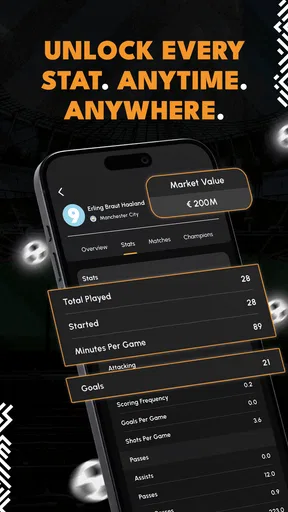
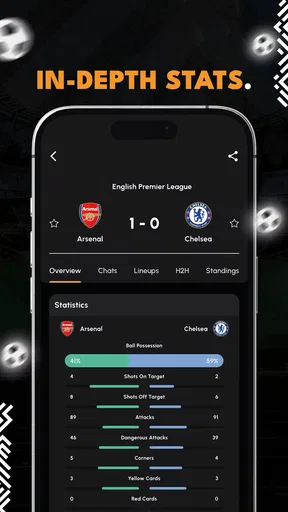
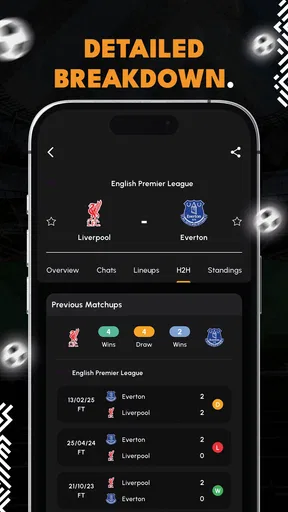
If you're a stats geek, you're in for a treat. IGScore offers in-depth statistics that give you insights into player performances, team formations, and match predictions. I found this feature particularly useful for fantasy soccer. You can dig deep into player data and make informed decisions, which is a game-changer for any fantasy league participant.
Ads: A Small Hurdle
Now, no app is perfect, and IGScore does have its share of ads. While they're not overly intrusive, they can be a slight distraction, especially if you're in the middle of checking scores. However, the app does offer an ad-free version if you're willing to pay a small fee. It's something to consider if you find the ads too bothersome.
Why IGScore Stands Out
So, what makes IGScore a standout choice among the myriad of soccer apps out there? For me, it's a combination of its real-time updates, comprehensive coverage, and user-friendly design. The app manages to strike a balance between providing detailed information and maintaining simplicity and ease of use.
Ultimately, Live Soccer Scores - IGScore is a solid pick for both casual fans and die-hard enthusiasts. Whether you want to keep track of your favorite team or explore new leagues, this app has you covered. With its robust features and practical design, it's like having your very own soccer hub right on your phone.
So, if you're ready to elevate your soccer-watching experience, give IGScore a shot. You might just find it's the perfect match for your soccer needs. And hey, with all the exciting matches happening, who wouldn't want to be in the know?
Pros
- Real-time updates keep you informed instantly.
- Comprehensive coverage of global leagues.
- User-friendly interface enhances navigation.
- Customizable notifications for favorite teams.
- Detailed match statistics and player info.
Cons
- Ads can be intrusive during live updates.
- Limited offline functionality.
- Occasional delays in score updates.
- Requires stable internet for optimal use.
- Some features locked behind a paywall.
FAQs for Live Soccer Scores - IGScore
What features does Live Soccer Scores - IGScore offer?
Live Soccer Scores - IGScore provides real-time updates on soccer matches from leagues worldwide. It includes live scores, match statistics, team line-ups, and player information. Users can also set notifications for their favorite teams and receive updates on goals, cards, and match outcomes. The app is designed for both casual fans and dedicated followers of the sport.
Is Live Soccer Scores - IGScore free to use?
Yes, Live Soccer Scores - IGScore is free to download and use. However, it may offer in-app purchases or advertisements to support its development and provide additional features. Users can choose to upgrade to a premium version, if available, to enjoy an ad-free experience or access advanced features.
How accurate and timely are the updates provided by the app?
Live Soccer Scores - IGScore is known for its accuracy and timeliness in delivering soccer scores and updates. The app sources information from reliable sports data providers, ensuring that users receive real-time notifications. However, occasional delays may occur due to network issues or data provider updates, but these are generally minimal.
Can I customize notifications for my favorite teams and matches?
Absolutely! Live Soccer Scores - IGScore allows users to customize notifications to receive alerts for specific teams, leagues, or matches. You can set preferences for receiving updates on goals, match start times, or final results. This feature ensures that you stay informed about the games and teams you care about the most.
Is Live Soccer Scores - IGScore available on both Android and iOS?
Yes, Live Soccer Scores - IGScore is available for both Android and iOS platforms. Users can download the app from the Google Play Store for Android devices or the Apple App Store for iOS devices. The app is optimized for a range of smartphones and tablets, providing a seamless user experience across different devices.


